Contact

More Time for What Matters

Patentraum is a Add-In for Word for IP professionals that helps you save time by handling your recurring tasks with AI, making your daily work easier.

Patentraum offers flexible modules—pay only for what you need. Choose from Chat, Drafting, Base (definitions, translations, spelling), Chat with a PDF, and Patent Data.

Patentraum - AI Toolbox for Patent Attorneys, Paralegals, Inhouse Counsel and Patent Examiner

Patentraum
Overview
Chat
Drafting
Base
Patent Data
Custom

Get an overview of Patentraum and discover all the powerful features and modules available to enhance your patent work.

The Chat module includes an intelligent and AI-powered PDF reader. The module makes it easier for you to get started with your PDF document and supports you in interpreting and searching for features. More info

The Drafting module includes AI buttons that help you draft patent applications and save time. More info

The Base module includes AI buttons for various basic purposes, such as spell checking, technical definitions, translations and much more. More info

With the Patent Data module, you can easily access patents and their data (claims, dates, PDF, etc.). OCR-scanned patent documents are also provided. More info

With the Custom module, you can create your own AI buttons that suit your individual needs. More info

Our Modules

Each module can be booked separately.

m = monthly *estimated associate hour ** Total = €2508 (€209 x 12) ≈ 1x Patent Application

Why Patentraum?

The advantages that make your daily work more efficient

Integrated directly into Word

No installation of new programs in your system - Patentraum works seamlessly in your familiar Word environment.

Low-threshold AI entry

Benefit from all advantages of AI applications without having to dive deep - easy entry into the world of artificial intelligence.

Text improvement & dictation enhancement

Use Patentraum to improve or revise your texts and supplement your dictations with AI support.

We take care of the technology

We pay your tokens and take care of everything running smoothly - you focus on your core business.

You maintain full control over your data

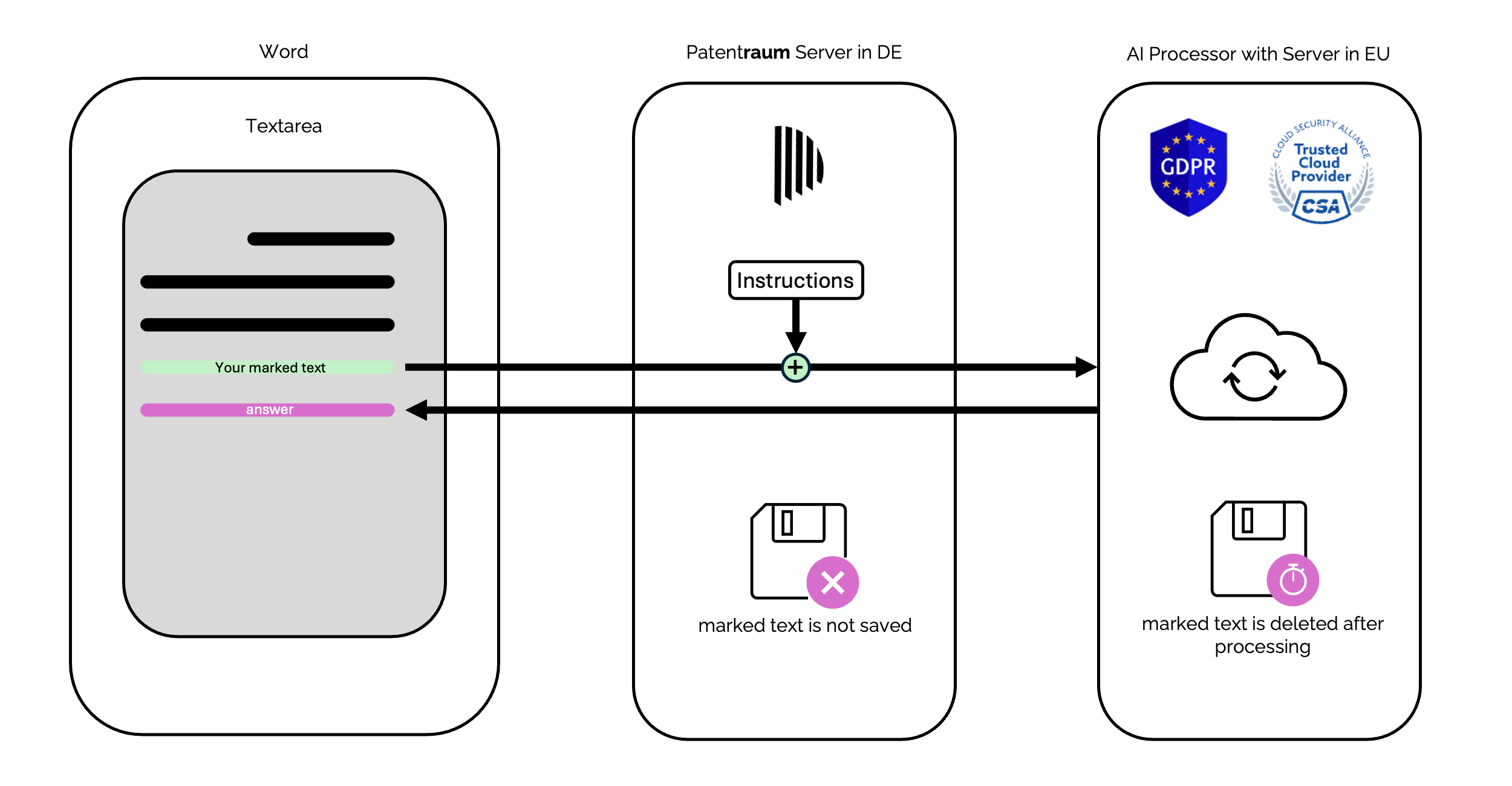
Only the text you mark is processed - no more, no less

1

Mark text

You mark the specific text that should be processed

2

Press AI button

You consciously decide with a click which content is sent to the Large Language Model

3

Secure & anonymized processing

Your marked text is transmitted encrypted and processed in Germany

Patentraum: KI für Patentanwälte in Deutschland

Highest security standards for IP professionals

🔐

Privacy & Compliance

  • ✅ GDPR-compliant data processing
  • ✅ No storage of sensitive data
  • ✅ Transparent data processing
  • ✅ Legal protection through contracts
🛡️

Technical Security

  • ✅ End-to-end encryption (TLS 1.3)
  • ✅ Secure Azure infrastructure
  • ✅ Anonymized data transmission
  • ✅ Regular security updates
🎯

User Control

  • ✅ Selective text selection by user
  • ✅ Approval by click
  • ✅ User determines content
  • ✅ Full control

Microsoft Azure Enterprise Security

Patentraum uses the proven Microsoft Azure infrastructure with the highest security standards. Your data is processed in German data centers and is subject to strict compliance requirements.

🏢 German data centers
🔒 ISO 27001 certified
⚖️ GDPR compliant
🛡️
Enterprise
Security

Easy installation directly in Microsoft Word

Start Word and then follow these steps...

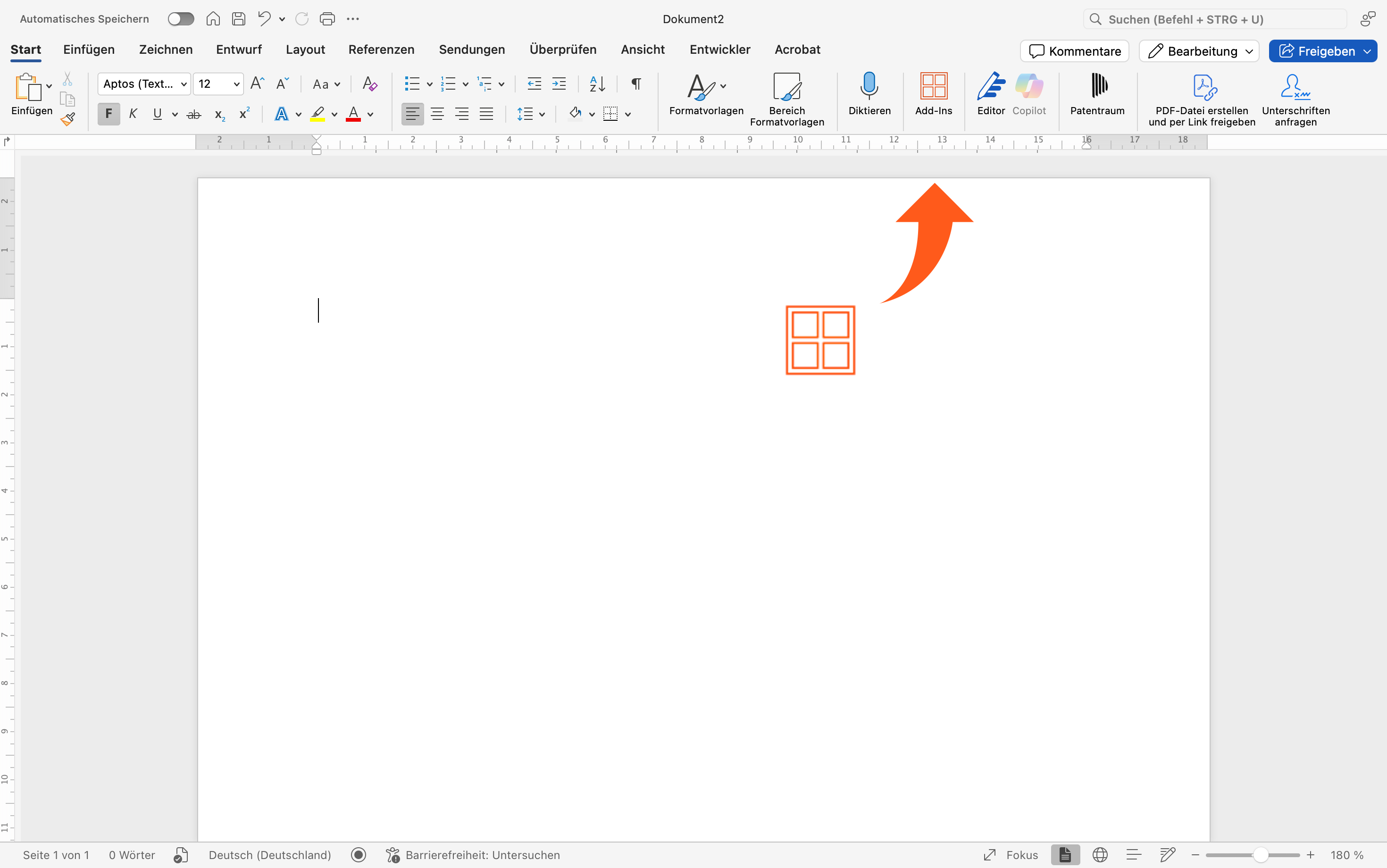
  1. Click on Add-ins in Word Open the 'Start' tab and then click on the red Add-Ins symbol in the menu bar.
  2. Search and add add-in Search for 'Patentraum' in the Office Store and click Add
  3. Register and test for 3 weeks free Register directly in the Add-In and test Patentraum for three weeks free in full scope.
Patentraum Add-in in der Word-Symbolleiste
Installation directly in Word

Founding Team

Ing. Fernando Saravia Rajal

Ing. Fernando Saravia Rajal

Software Architect

More Info

+
🏗️
Software Architect Platform architect with many years of professional experience
⚙️
Technical Expertise Develops enterprise software & cloud architectures professionally
🔧
State of the Art State of the Art knowledge in developing scalable, secure applications
Dipl.-Ing. Johannes Kretschmar

Dipl.-Ing. Johannes Kretschmar

Patent Attorney

More Info

+
⚖️
German & European Patent Attorney Understands the attorney side
🔍
Senior Inhouse Counsel Understands the industry side
🎓
Diploma Engineer & Programmer Understands the software side, but less than Fernando

Get in Touch

Do you have questions about Patentraum? We are happy to help you.

0 / 1000 characters

Email

info@patentraum.de

Location

Germany

FAQ

Frequently asked questions about AI for patent attorneys in Germany.

Is Patentraum GDPR oriented?

Patentraum is designed with data protection and security in mind. You control which text is processed, and we focus on clear data control.

Which data is sent to the AI?

Typically, only the text you select (and, if applicable, your instruction) is processed. There is no automatic transfer of full documents without your selection.

Does Patentraum work directly in Microsoft Word?

Yes. Patentraum is a Word add-in, so you can use AI functions directly via buttons in your Word workflow.

Where are my data stored?

Depending on the data type, processing and storage follow different paths. The goal is to minimize exposure and keep sensitive data protected.

Who is Patentraum for?

Patent attorneys, paralegals, inhouse counsel, and patent examiners.

How fast can I get started?

Installation usually takes just a few minutes. After that, you can select modules and start using them right away.

What happens after the trial period ends?

After the trial ends, the full version is simply deactivated. You can then book modules on your own. There is no automatic subscription.